Supertag CLI
Free & Open Source Query Language MCP Server Semantic Search Graph Traversal Aggregation Attachments Raycast

Supertag CLI

Command-line powerhouse for Tana. Semantic vector search, AI tool integration, automated exports, and powerful queries. Open source under MIT license.

v1.12.2 · What's new?

Overview

Your Tana Data, Your Way

Supertag CLI brings the power of the command line to your Tana workspace. Query your knowledge base with lightning-fast full-text search, automate exports, and build powerful integrations.

  • Semantic vector search — find nodes by meaning, not just keywords
  • Graph traversal — explore connections with multi-hop queries
  • Aggregation — group and count nodes by field or time period
  • MCP server for AI tools (ChatGPT, Cursor, Claude Code, Windsurf)
  • Full-text search across your entire workspace in milliseconds
  • Automated browser-based exports with session persistence
$ supertag search "AI research"
Found 47 nodes in 23ms

#research AI Safety Framework
#project GPT Integration Notes
#meeting AI Team Standup 2025-12-01
...
$ supertag create todo "Review paper"
✓ Created todo in Tana
$ supertag sync index
Indexing workspace export...
✓ Indexed 107,432 nodes in 1.2s

Capabilities

Powerful Features

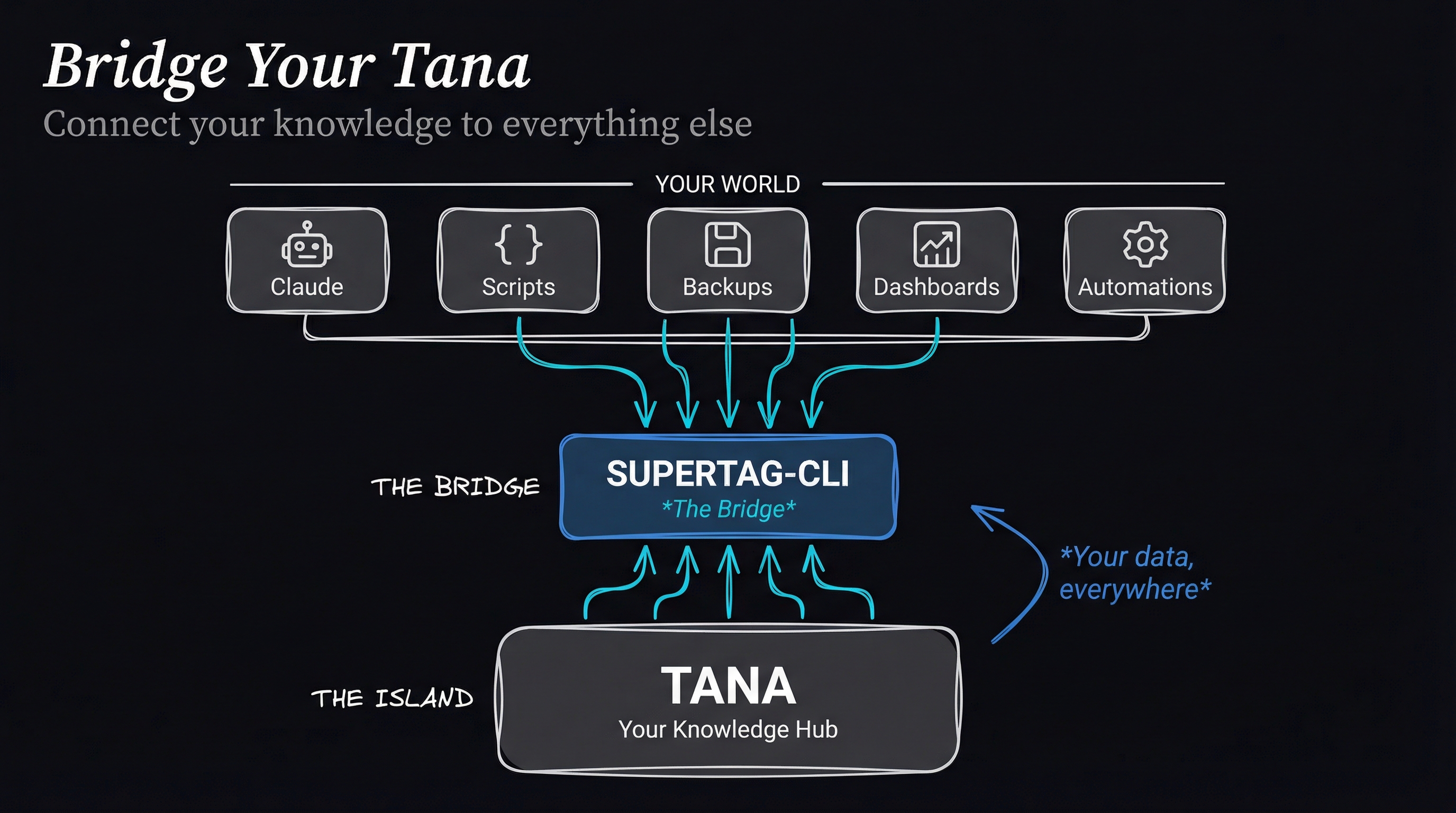
Bridge Your Tana - Connect your knowledge to Claude, Scripts, Backups, Dashboards, and Automations via Supertag-CLI

FIND Unified Query Language

SQL-like syntax for complex queries. Filter by fields, dates, status, and more. Chain conditions with AND/OR logic.

# Find completed tasks from last week
supertag query "find task where
  Status = Done and modified > 7d"

MCP AI Tool Integration

Use your Tana data with ChatGPT, Cursor, VS Code Copilot, Claude Code, and other MCP-compatible AI tools. Local execution, no cloud required.

# 12+ MCP tools available:
tana_search, tana_semantic_search,
tana_query, tana_aggregate, tana_related,
tana_tagged, tana_node, tana_create...

EMBED Semantic Vector Search

Find nodes by meaning, not just keywords. Vector embeddings enable semantic search that understands context and concepts.

# Configure embeddings
supertag embed config --model mxbai-embed-large

# Search by meaning
supertag search "auth issues" --semantic

EXPORT Automated Backup

Browser-based exports that just work. Login once, export forever. Supports all workspaces with a single command.

# First-time setup
supertag-export login

# Export all workspaces
supertag-export run --all

READ Query Your Knowledge

Lightning-fast full-text search powered by SQLite FTS5. Find anything in your workspace in milliseconds.

# Search everything
supertag search "meeting notes"

# Find by supertag
supertag search --tag project --limit 10

WRITE Create Nodes

Create nodes with any supertag directly from the command line. Perfect for automation and quick capture.

# Create a todo
supertag create todo "Buy groceries"

# Create a meeting note
supertag create meeting "Team Standup"

SYNC Keep Up to Date

Index your exports into a local SQLite database. Schedule with cron for always-fresh data.

# Index latest export
supertag sync index

# Watch for changes
supertag sync monitor --watch

SERVER Webhook Integration

Built-in HTTP server exposes your Tana data as API endpoints. Perfect for integrations and automations.

# Start webhook server
supertag server start --daemon

# Query via HTTP
curl localhost:3100/search -d '{"q":"AI"}'

AGGREGATE Analytics & Grouping

Group and count nodes by field values or time periods. Perfect for dashboards, status breakdowns, and time-series analysis.

# Count tasks by status
supertag aggregate --tag task --group-by Status

# Time-based grouping
supertag aggregate --tag meeting --group-by month

RELATED Graph Traversal

Explore connections in your knowledge graph. Find nodes through references, fields, and parent-child relationships with multi-hop traversal.

# Find what references a topic
supertag related <id> --direction in

# Multi-hop exploration
supertag related <id> --depth 2

WORKSPACES Multi-Space Support

Manage multiple Tana workspaces with ease. Personal, work, projects — all from one CLI.

# Add workspaces
supertag workspace add WSID --alias work

# Query specific workspace
supertag search "project" -w work

UPDATE Self-Updating

Built-in auto-update keeps you on the latest version. Automatic backup and rollback if something goes wrong.

# Check for updates
supertag update check

# Update to latest
supertag update install

Want to Master These Features?

Learn how to bridge your Tana knowledge to AI assistants, local backups, and automations with our video course.

Start Free Course →

Performance

Built for Speed

107k
nodes/second indexing
<50ms
search latency
57MB
CLI binary size
0
runtime dependencies

Standalone executables — no runtime required. Export tool needs Playwright.

Companion App

Raycast Extension

Capture thoughts to Tana from anywhere on your Mac. The Supertag Raycast extension provides instant access to your Tana workspace — no browser required.

  • Quick capture — Create todos, notes, ideas with a keyboard shortcut
  • Web clipper — Save articles with AI-powered summaries and key points
  • Dynamic forms — All your supertags with their fields, auto-generated
  • Nested nodes — Create hierarchies with unlimited depth
  • Smart browser detection — Works with Safari, Chrome, Arc, Brave, Firefox
View on GitHub Requires Raycast + supertag-cli
Raycast
⌘ + Space → "Capture to Tana"
Supertag: todo
Name: Review Q1 roadmap
Status:
Due: 2026-01-20
✓ Created todo in Tana
📝

Quick Capture

Todos, notes, ideas with nested children

🌐

Web Clipper

AI summaries via Claude or Ollama

Instant Forms

Schema-aware fields load in <10ms

Learn

Video Course

Go from installation to advanced integrations with step-by-step video lessons.

Free

Bridge Your Tana: Essentials

4 lessons · 17 minutes

  • Install supertag-cli on any platform
  • Export and index your Tana workspace
  • Run your first search queries
  • Connect to Claude via MCP
Start Free Course
Coming Soon

Bridge Your Tana: Complete

Full course · All modules

  • SQL-like queries and aggregations
  • Semantic search with embeddings
  • CSV exports and spreadsheet integration
  • Automation workflows and scheduling
Get Notified

Lifetime access · Community support · courses.invisible.ch

Stay in the Loop

New features, tips, and the upcoming video course. No spam.

Want to learn supertag-cli? Start the free course →

Download Supertag CLI

v1.12.2 · MIT License

Free and open source. Download, use, modify, and contribute. No restrictions, no license keys, no activation required.

You're getting a lot for free here.

If Supertag CLI saves you time or makes your Tana workflow better, consider supporting continued development. Every contribution helps fund new features.

Support Development →

Quick Install (Recommended)

One command installs everything: Bun, Playwright, Chromium, and supertag-cli.

# macOS / Linux
curl -fsSL https://raw.githubusercontent.com/jcfischer/supertag-cli/main/install.sh | bash

# Windows (PowerShell)
irm https://raw.githubusercontent.com/jcfischer/supertag-cli/main/install.ps1 | iex

Configures PATH and MCP for Claude Desktop, Cursor, and Claude Code automatically.

— or download manually —
Download for Your OS

Detecting your operating system...

Open source under MIT License · No telemetry, no tracking

Getting Started

Requirements

Operating System

macOS (ARM/Intel), Linux x64, or Windows x64

Runtime

None! Standalone executables included

Tana Account

Active Tana subscription with API access

Support

Frequently Asked Questions

Do I need a Tana subscription?

Yes, Supertag CLI works with your existing Tana account. You'll need API access, which is included with Tana subscriptions.

How does the export feature work?

Supertag CLI uses browser automation (Playwright) to export your workspace as JSON, just like the manual export in Tana. Your session is saved, so you only need to log in once.

Is my data safe?

Absolutely. Supertag CLI runs entirely on your machine. Your data never leaves your computer — there's no cloud service, no telemetry, no tracking.

Can I use it on multiple computers?

Yes! Supertag CLI is open source — install it on as many devices as you want, no restrictions.

What is MCP and how does the AI integration work?

MCP (Model Context Protocol) is a standard for connecting AI tools to data sources. The included supertag-mcp server provides 8 tools to search, query, and create nodes. It works with ChatGPT Desktop, Cursor, VS Code Copilot, Claude Code, and Windsurf. The server runs locally — your data never leaves your computer.

Where can I get help?

Open an issue on GitHub for bugs or feature requests. Check existing issues first — someone may have already solved your problem.

Ready to Supercharge Your Tana Workflow?

Join the Tana power users who've unlocked the full potential of their knowledge base.

Download Now Support the Project Star on GitHub